


This is my third website, but I’d prefer to call it my first, although it’s still very simple.
1 Website Setup #
1.1 Setup Guide #
HUGO Claimed to be “The world’s fastest framework for building websites.” Currently has 86k+ stars on Github. It’s said that there’s relatively little Chinese documentation, which isn’t very user-friendly for someone like me with poor English skills.
Blowfish “A powerful, lightweight theme for Hugo.” The interface is beautiful, and the content is very detailed; I really like it. It has many maintainers and is available in multiple languages, including Chinese. Important documentation includes: Shortcodes | Partial Templates | Page Layout | Advanced Customization | File Header - robots etc.
N9O is the personal blog of the founder of Blowfish. One article in it introduces how to build a homepage using Blowfish and Hugo.
1.2 Environment Setup #
To use the Hugo framework and Blowfish theme, I installed Git | Go | Node.js and Sass | Hugo | Github CLI and other tools. I’m not sure if they’ll be needed, but I installed them anyway. Besides ensuring that Hugo was the extended version, I didn’t pay much attention to version information; it was basically the latest version currently installed. I’m using a Windows operating system.
Two system variables need to be created for Go: GOROOT and GOPATH.
Initially, I couldn’t understand the installation options for the Windows Chocolatey package manager, so I installed Node.js first and then downloaded it via npm. You need to add the environment variables C:\Program Files\nodejs\ and C:\Users\username\AppData\Roaming\npm.
There are two ways to install Hugo: prebuilt binaries and package managers.
git version
go version
node -v
sass --version
hugo version
gh version
git version 2.52.0.windows.1 go version go1.25.6 windows/amd64 v24.13.0 1.97.3 compiled with dart2js 3.10.7 hugo v0.154.5-xxx+extended windows/amd64 BuildDate=xxx VendorInfo=gohugoio gh version 2.86.0 (2026-01-21)
1.3 Common commands #
-
Windows
Type cmd to start&Press Ctrl+C to stop -
View commands
hugo -h- Start service
hugo server -Dhugo server --disableFastRender- Create new article
hugo new content projects/demo.md2 Content Management #
2.1 Directory Structure #
| Folder | File |
|---|---|
public |
Website used for publishing, automatically generated, retains historical images, etc., can be cleaned up periodically |
resource |
Cache, automatically generated, can be cleaned up |
theme |
Theme, such as Blowfish |
assets |
Resources such as images, CSS, Sass, JavaScript, etc., added as needed |
connotent |
Articles and related resources, stored by directory |
config |
Custom site configuration |
i18n |
The .yaml file contains translations of commonly used website information and supports customization. |
static |
Static files such as website icons |
data |
Additional data |
layouts |
Page templates |
archetypes |
File templates |
A Hugo project can have multiple themes, and a theme is essentially a Hugo project. Folders like assets and i18n in the root directory also exist in the theme directory, and sometimes files in the theme directory are used preferentially. hugo server -D will show which folders Hugo prioritizes.
If there are no changes after making changes, try exiting the command prompt and clearing your browser cache.
2.2 Shortcodes #
Blowfish Extended Shortcode
APlayer Wow, such a beautiful HTML5 music player.
2.3 Decorative Materials #
Yizi.cn An online artistic font generator website, free, sufficient, and no login required. If you are not satisfied with the colors or font layout, just use PSP to fix it. By the way, the fonts installed for the computer are in .ttf format, and will display in WPS and Word after installation; CAD fonts are in .shx format, and can be placed in the Fonts directory.
Zhefeng Wallpaper has a large number of beautiful desktop wallpaper materials, but unfortunately, .mp4 format live wallpapers cannot be used as website backgrounds. No login is required.
Alibaba Vector Icon Library is a vector icon management and exchange platform created by Alibaba. The CSDN logo was found here. Login password: 18762+h1. assets/icons is the storage location of SVG images; for custom icons, it is recommended to follow the theme with fill="currentColor".
Google Translate Language habits differ between Taiwan and mainland China, and many things are called differently. A simple word-for-word translation is insufficient. The more complete the description, the better it reflects the context, and the more accurate the translation will be.
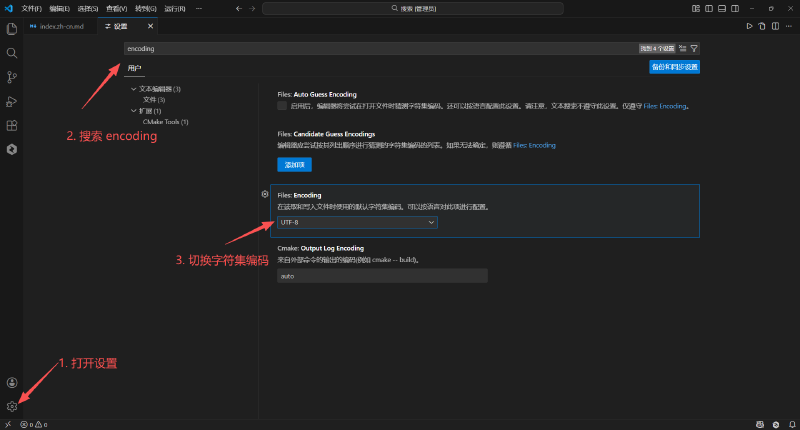
VScode Switch Character Encoding